5 AI Pet Cameras With Treat Dispensers Every Anxious Dog Owner Needs
Heads up: This post contains affiliate links. If you buy something through them, I earn a small commission at no extra cost to you. It keeps the lights on and the kibble bowl full. Read the full boring legal stuff here.
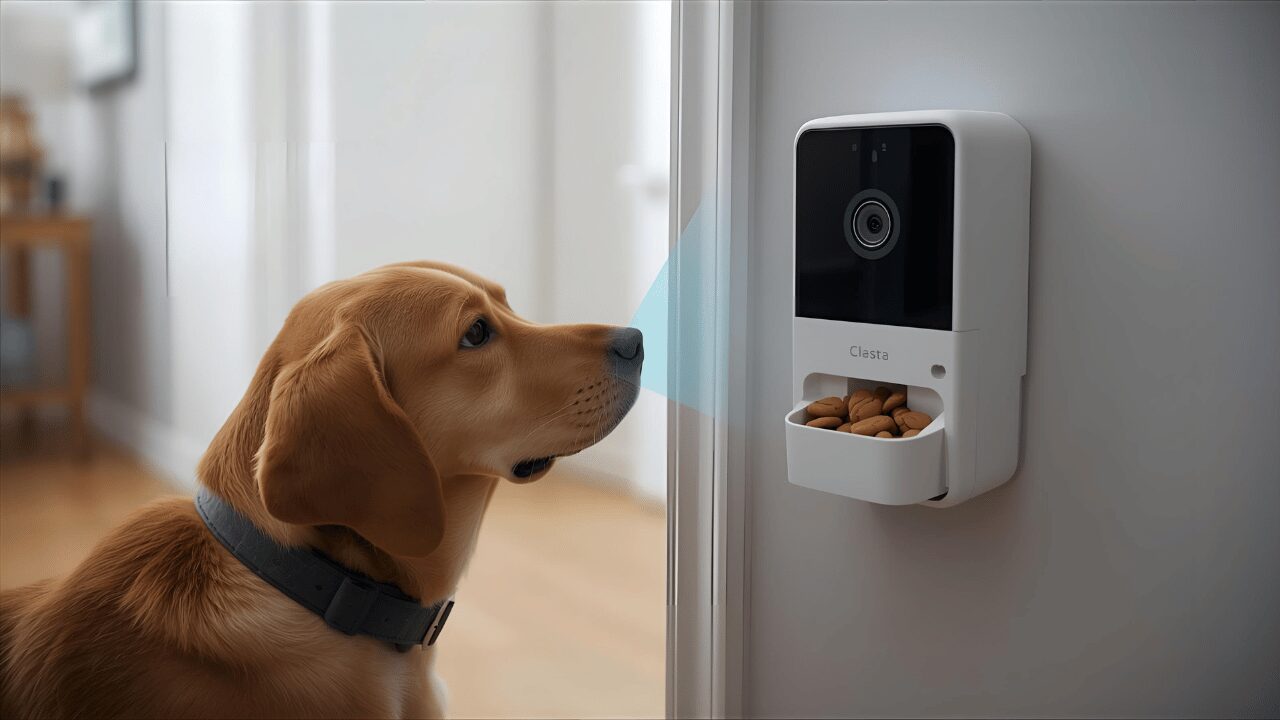
Separation anxiety in dogs is a nightmare. There is no other word for it.
Your dog hits the panic button the second you touch your keys. They scream for hours, they eat the drywall, they pace until their pads bleed, and they hurt themselves trying to escape a house that has become a prison. And you? You stand on the other side of the door feeling like a traitor every single time you leave.
Let’s cut through the noise: most dog trainers won't tell you this to your face, but separation anxiety doesn't fix itself. You can't "tough love" your way out of a panic attack. That's where AI pet cameras with treat dispensers stop being toys and start being tactical gear.
The best ones don't just let you watch the train wreck; they let you intervene. You can actively train, reward the rare moments of silence, and catch the anxiety spike before it turns into a full-blown meltdown.
I'm talking about tech that detects the specific frequency of a panic bark, alerts you before the destruction starts, lets you deploy treats remotely to reinforce calm, and tracks the patterns so you know exactly when the war is lost. This isn't about spying on your dog for kicks. It's about having a weapon to fight the panic through systematic desensitization, the only treatment that actually works.
Let's dig into the five best AI pet cameras that actually help anxious dogs (and the owners who love them).
Why AI Pet Cameras Actually Help With Separation Anxiety
Let me be direct: most people buy these things thinking they'll just "check in" during lunch. That's not how the beast of separation anxiety works.
Separation anxiety is a panic disorder. Your dog isn't being a jerk out of spite. They are genuinely terrified that you are dead and never coming back. Their brain is a chemical soup of cortisol. They are in fight-or-flight mode. Watching them suffer in 1080p without being able to do anything?
That just destroys your mental health. But here's where AI pet cameras with treat dispensers change the battlefield:
They Enable Systematic Desensitization Training
Systematic desensitization is the gold standard because it’s the only thing that rewires the brain. The logic is brutal but simple:
- Leave for 10 seconds → Dog doesn't die → Toss treat remotely
- Leave for 30 seconds → Dog doesn't die → Toss treat remotely
- Leave for 1 minute → Dog stays calm → Toss treat remotely
- Gradually increase the duration until they believe you always come back
The camera lets you see the exact second they hold it together, and the treat dispenser lets you reward that victory instantly, even when you're outside the blast radius. Without a camera? You're blind. You have no idea if your dog is calm or pacing a hole in the rug. You can't time the reward. The training fails.
They Catch Anxiety Before It Escalates
AI-powered cameras detect the early tremors: the pacing, the low whine, the door staring, the excessive panting. You get an alert on your phone. That's your cue to intervene before the panic sets in. Toss a treat. Use the two-way audio to break the loop. Redirect their brain.
Early intervention = less cortisol = faster recovery = a dog that doesn't destroy the door frame.
They Let You Track Progress Over Time
The best AI cameras log the data. You can see:
- What time of day the demons come out
- How long your dog holds it together before breaking
- Whether your training is actually working or if you're just spinning your wheels
This data is ammunition for you and your vet. You're not guessing anymore. You have the black box recording. With that said, let's look at the five tools worth your money. RELATED CATEGORY: Smart Pet Technology
AI Treat‑Dispensing Pet Cameras: Side‑by‑Side Full Comparison
| Camera | Price (range) | Video / View | Night Vision | AI / Alerts | Treat Capacity / Toss | Storage | Best For | Link |
|---|---|---|---|---|---|---|---|---|
| Furbo 360° Dog Camera | $44–$99 (promo dependent) | 1080p + motorized 360° pan | IR + Color Night Vision | Bark, person, “Dog Selfie”, activity timeline (Dog Nanny) | ≈100+ treats; 1–6 ft toss; quiet motor | Cloud history (subscription) | Diagnosed SA, multi‑room tracking, early‑alert training | Furbo 360° |
| Petcube Bites 2 | $69–$105 | 1080p / 30fps, 160° FOV, 4× zoom (fixed) | IR Night Vision (room‑wide) | Sound/motion; smart alerts via Care (optional) | Fling ~6 ft; 1.5 lb hopper (small crunchy) | Optional cloud; works without sub | Budget setups, single‑room monitoring | Petcube Bites 2 |
| Owlet Home Pet Camera | $45–$55 (value pick) | 1080p, ~165° wide (fixed) | IR Night Vision | Free, bark & motion alerts (no subscription) | Treat toss; good capacity; Alexa support | Local photo/video capture | No‑subscription<; fixed‑area dogs | Owlet Home |
| Furbo Mini | $59–$99 | 1080p, 130° FOV (fixed, compact) | Color Night Vision (compact optics) | Bark alerts via Dog Nanny subscription | Smaller reservoir; consistent toss | Cloud via subscription | Small spaces, travel, room‑specific setups | Furbo Mini |
| Skymee Owl Robot | $139–$179 | 1080p cam on mobile robot (driveable) | IR Night LEDs | Motion/sound; patrol/auto‑follow (variable) | Onboard hopper; interactive treat play | App clips (model dependent) | Interactive distraction, play + monitoring | Skymee Owl |
Tips: Use round, 0.3–0.5 in crunchy treats for consistent tossing. Most AI alerts & video history live behind paid plans; plan accordingly if you need real‑time bark detection and activity timelines.
1. Furbo 360° Dog Camera — Best Overall for Anxiety Training ($44-$99)

Amazon Link: Furbo 360° Dog Camera
The Furbo 360° is the one separation anxiety specialists actually use. Not because it’s pretty, but because it works. I'm not exaggerating. If you look at the toolkit of any certified separation anxiety trainer (CSAT) worth their salt, the Furbo is there. Here's why it dominates:
The specs:
- 1080p HD video with 360° pan – it tracks the panic around the room
- Color night vision – so you can see the fear in their eyes even in the dark
- Barking alerts – instant push notification when the screaming starts
- AI-powered "Dog Selfie" alerts – tells you when your dog is staring at the lens (a huge early warning sign)
- Treat tossing – holds 100+ treats, fires them 1-6 feet like a mortar
- Two-way audio – talk to your dog, hear the chaos clearly
- Person alert – notifies you if a human enters the perimeter (security bonus)
- Smoke & CO alarm detection – because paranoia is part of the job description
Why it's the best for anxiety:
The barking alert is the MVP. Most anxious dogs escalate in a predictable pattern: quiet stress → whining → barking → chaos. This alert catches you at the whining stage, giving you a chance to intervene before they hit the red line. The "Dog Selfie" alert is surprisingly useful.
When a dog stares at the door or the camera, they are asking "where are you?" It's the calm before the storm. The 360° pan is critical. If your dog paces between the door and the window, a fixed camera misses half the show. This one follows the target.
The training workflow:
- Plant the Furbo near the door or the primary waiting zone
- Leave for 10 seconds while watching the live feed like a hawk
- When your dog holds it together, fire a treat
- Return before the anxiety breaks them
- Repeat until you both stop shaking
Furbo's treat-tossing mechanical whir becomes a positive trigger. Your dog learns: "That sound = food = I am safe."
The catch:
The best features (barking alerts, activity tracking, video history) are locked behind the Furbo Dog Nanny subscription ($6.99/month or $69/year). The camera functions without it, but you lose the AI brain. For separation anxiety? You pay the tax. You need those alerts.
Who should get this:
- Dogs with a clinical diagnosis of separation anxiety
- Anyone working with a pro trainer (they'll tell you to buy it anyway)
- Multi-dog households (tracks them separately)
- Remote workers needing to monitor short absences
Skip it if:
- You're broke and can't stomach the monthly fee
- Your dog likes treats but isn't actively panicking (cheaper gear works)
- You need a wall mount (this sits on a table)
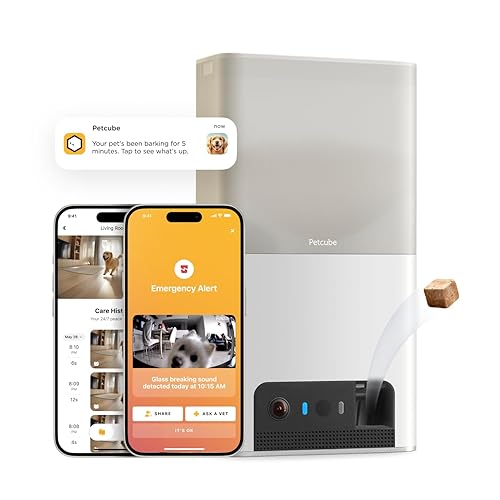
2. Petcube Bites 2 — Best Budget-Friendly Option ($69-$105)
Amazon Link: Petcube Bites 2
If you want the treat-tossing and the alerts but Furbo prices make you wince, the Petcube Bites 2 is the play. It's the workhorse. It’s been around. It’s not flashy, but it gets the job done.
The specs:
- 1080p HD video with 160° field of view – wide enough, but fixed in place
- 4x digital zoom – zoom in to check for drool or dilated pupils
- Night vision – infrared, works in the dark
- Treat flinging – works with most hard kibble, flings it across the room
- Two-way audio – clear enough to be heard
- Sound and motion alerts – tells you when the dog moves or screams
- Works with Alexa – if you want to toss treats by voice
Why it works for anxiety:
The 160° field of view covers most of a standard room. If your dog is a "door waiter" who stays put, this will catch them. The sound alerts are solid. It doesn't have the AI brain of the Furbo, but it knows loud noises. Barking, whining, howling, it hears it. The treat flinging is actually kind of fun. The motor spins up, then fling. It creates a game, a distraction to break the fixation on the door.
The budget advantage:
No mandatory subscription. It works out of the box. They offer a sub (Petcube Care), but you don't need it to make the thing function. For anxiety training on a shoestring budget, this keeps you in the game without the monthly bleed.
The catch:
Fixed angle. If your dog paces out of frame, they are ghost. You can't pan to find them. The treat reservoir is smaller. You'll be refilling it more often. Audio can have a delay. It's annoying, but not a dealbreaker.
Who should get this:
- Budget warriors ($100-$150 max spend)
- Dogs with moderate anxiety (not destructive panic)
- Single-room setups (if the dog stays in the crate or one room)
- People who hate subscription models
Skip it if:
- Your dog paces the entire house (you need the pan)
- You need the best AI detection on the market (Furbo wins)
- You have multiple dogs (hard to tell who is barking)
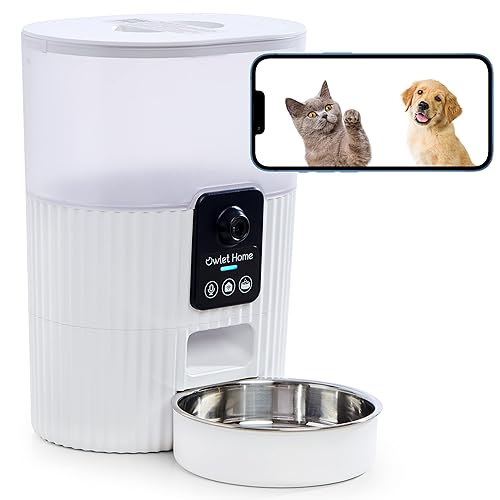
3. Owlet Home Pet Camera — Best for No Subscription Fees ($45-$55)
Amazon Link: Owlet Home Pet Camera
The Owlet Home is the new kid, but it's making waves for one simple reason: zero subscription fees, ever. Everything works. No paywall.
The specs:
- 1080p HD video with 165° field of view – wide angle lens
- Night vision – infrared mode
- Treat dispenser – good capacity, reliable toss
- Two-way audio with custom voice messages – record yourself to play with the treat
- Barking alerts – free, totally included
- Motion detection – adjustable sensitivity
- Works with Alexa – for voice control
- Photo and video capture – save locally to your phone
Why it's great for anxiety:
The custom voice message is a sleeper hit. You record: "Good boy! I'll be back!" and it plays when the treat fires. For an anxious dog, hearing your voice associated with food is powerful medicine. It builds a bridge of safety. And the barking alerts are free. Most companies charge you $10 a month for that privilege. Owlet just gives it to you.
The anti-subscription advantage:
Let's run the numbers:
- Furbo: $170 + $70/year = $240 year one.
- Owlet: $150 flat.
Over three years, you save over $200. If you're in this for the long haul (and recovery takes months), that's money you can spend on treats.
The catch:
No pan/tilt. It stares where you point it. The app is clunky. It works, but it feels like V1.0 software compared to Furbo's polish. Storage is local. If you lose your phone or the connection dies, you have no cloud backup.
Who should get this:
- Anyone allergic to monthly fees (me)
- Long-term recovery projects
- Dogs who are stationary when stressed
- Value hunters
Skip it if:
- You need to follow your dog around the room
- You want top-tier AI detection
- You want cloud storage for evidence
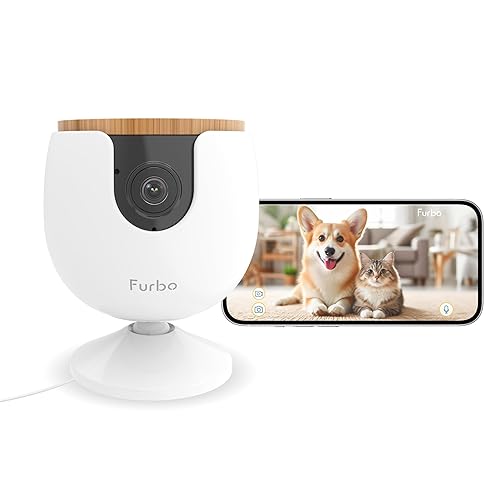
4. Furbo Mini — Best for Small Spaces & Travel ($59-$99)
Amazon Link: Furbo Mini Dog Camera
The Furbo Mini is exactly what it says on the tin. It's the 360° model, shrunk down, stripped of the motor, and sold cheaper.
The specs:
- 1080p HD video with 130° field of view – fixed angle, tighter view
- Color night vision – still clear
- Treat dispenser – functional, but holds less ammo
- Two-way audio – same tech as the big brother
- Barking alerts – still needs the Nanny sub
- Compact design – tiny footprint
Why it's useful for anxiety:
It's small. You can stick it on a bookshelf or a nightstand without it looking like a monolith. For dogs who panic in specific rooms (like the bedroom), this lets you cover that zone without buying a second expensive unit. It travels well. If you take your anxious dog to an Airbnb, this thing packs in a bag. Familiarity helps anxiety.
The training advantage:
It uses the same treat-tossing sound. Your dog gets the conditioning. The only downside is you're reloading it more often.
The catch:
No pan. 130° is narrow. You miss the corners. Small tank. If you're doing heavy training, you'll empty it fast. Still requires the subscription tax for the good features.
Who should get this:
- Apartment dwellers with zero counter space
- Frequent travelers
- Bedroom/Office specific monitoring
- Room-specific anxiety cases
Skip it if:
- You need to see the whole room
- You have a large open plan space
- You want one camera to rule them all (get the 360°)
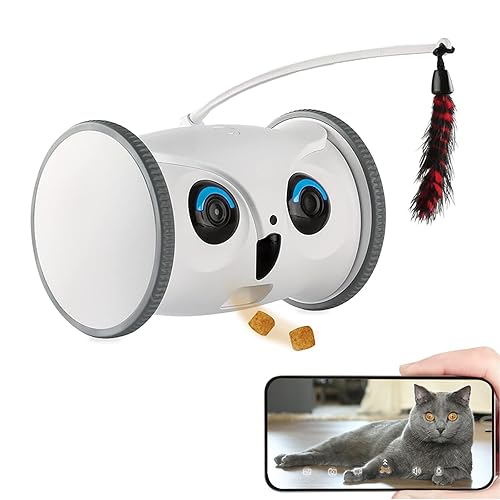
5. Skymee Owl Robot — Best for Interactive Distraction ($139-$179)
Amazon Link: Skymee Owl Robot Pet Camera
The Skymee Owl is weird. It's not a camera on a shelf; it's a tank that drives around your floor. Hot take: This is either brilliant or a disaster, depending entirely on your dog's psyche.
The specs:
- 1080p HD camera – mobile, low angle
- 360° movement – you drive it like an RC car app
- Treat dispenser – built-in
- Two-way audio – talk while you drive
- Night vision – sees in the dark
- Auto-follow mode – supposed to follow the dog (results vary)
- Obstacle detection – mostly avoids walls
Why it works for some anxious dogs:
Distraction is a powerful drug. If your dog is fixated on the door, a robot rolling by can break that trance. You can drive to them. If they hide under the bed, you can roll in there and offer a peace offering. For high-energy dogs, it's a toy. It's interaction. It burns the nervous energy.
The training potential:
"Find the treat" games. Drive it, drop a treat, run away. It engages the prey drive and shuts off the anxiety brain for a few minutes.
The catch:
This is not for every dog. If your dog is already fearful, a rolling robot is a monster. It will make things worse. If your dog is aggressive, they will kill it. I've seen it happen. The auto-follow is janky. The battery life is short. If it dies while your dog is freaking out, it's a paperweight.
Who should get this:
- High-energy dogs whose anxiety comes from boredom
- Toy-motivated players
- Owners who want to play video games with their dog
- Tech nerds
Skip it if:
- Your dog is scared of the vacuum (they will hate this)
- You need a reliable, 24/7 sentry
- You have deep carpet (it gets stuck)
- You hate charging things
Quick Comparison: Which Camera Fits Your Situation?
| Your Dog's Anxiety Level | Best Camera |
|---|---|
| Diagnosed separation anxiety, needs systematic training | Furbo 360° (#1) |
| Moderate anxiety, you're on a budget | Petcube Bites 2 (#2) |
| Mild-moderate anxiety, you hate subscriptions | Owlet Home (#3) |
| Anxiety in small spaces, you travel often | Furbo Mini (#4) |
| High-energy anxiety, needs distraction games | Skymee Owl Robot (#5) |
How to Actually Use These Cameras for Separation Anxiety Training

Buying the gear is the easy part. Using it correctly is the work. Here's the protocol vetted by behaviorists using positive reinforcement:
Week 1-2: Baseline & Conditioning
Goal: Make the robot your friend.
- Set it up. Don't leave yet.
- Toss treats randomly while you are watching TV.
- Teach the dog: Mechanical noise = Food.
- Build the bank account of trust.
Week 3-4: Door Conditioning
Goal: Break the "Keys = Abandonment" link.
- Put on shoes → Toss treat → Take off shoes.
- Grab keys → Toss treat → Put down keys.
- Touch door handle → Toss treat → Walk away.
- Open door → Toss treat → Close door.
- Do this 20 times a day until they look bored.
Week 5-8: Time-Based Desensitization
Goal: Stretch the rubber band without snapping it.
- Leave for 10 seconds → Watch cam → Dog calm? → Treat → Return.
- 30 seconds → Same deal.
- 1 minute → Same deal.
- Push the envelope by seconds, not minutes.
Critical rule: Always come back before they panic. If they break at 3 minutes, you failed that rep. Go back to 2 minutes.
Week 9+: Real-World Application
Goal: Actual life.
- Go to the store.
- Watch the feed for the first 15 minutes (the danger zone).
- Treat every 5 minutes if they are good.
- Fade the treats out over time.
Pro tip: Trust the alerts. If your phone buzzes, check the feed. If they are losing it, go home. Don't let them "cry it out." That just reinforces the trauma. RELATED: Pet Treats Guide: Choose Healthy & Delicious Snacks for Your Pet
The Bottom Line: AI Cameras Aren't Magic, But They're Close
Let's be real: This camera won't fix your dog. You fix your dog. The camera just gives you the eyes to do it. But here's what they will do:
- Give you the truth about what happens when the door closes
- Enable the only training that works (desensitization)
- Catch the panic before the neighbors call the cops
- Allow remote rewards (which is basically magic)
- Provide data so you aren't guessing
Separation anxiety breaks your heart. It makes you a prisoner in your own home. These tools don't fix the guilt. But they give you a path out of the woods. Pick the one you can afford. Commit to the protocol.
Give it 3 months of hard work. Your dog won't thank you. They don't have the capacity. But you'll see it in the silence. You'll see it in the nap they take while you're at the store. And one day, you'll just... leave. And it will be fine.

How to Choose the Right AI Pet Camera
When selecting an AI pet camera with treat dispenser, consider these six factors:
1. Home Size
- Big house? You need 170°+ field of view or a pan motor. Don't cheap out on a fixed lens.
- Open floor plan? Get two cameras. Blind spots are where the trouble happens.
2. Number of Pets
- Single pet: Standard hopper (100 treats) is fine.
- Pack dynamics: You need a big tank (200+) and a fast firing mechanism.
3. Internet Speed
- 2K (1440p): Needs 5 Mbps upload. If your internet sucks, this will lag.
- 1080p: Works on 2 Mbps.
- Test your Wi-Fi at the dog's level, not just near the router.
4. Budget Range
- Budget: $40–$80. Functional.
- Mid‑range: $80–$120. Reliable.
- Premium: $120+. Features you actually want.
- Don't buy the $20 knockoff. It will disconnect when you need it most.
5. Key Features to Prioritize
- App stability is more important than video quality.
- Night vision is non-negotiable.
- Two‑way audio needs to be loud enough to be heard over a bark.
- Latency matters. If the alert is 2 minutes late, it's useless.
- Storage is good for proof, but live feed is king.
6. Wi‑Fi Connectivity
- Make sure it supports 2.4GHz (older routers).
- If you have 5GHz, check compatibility. Don't buy a brick.
Ready to help your anxious dog?
Start here:
- Best overall: Furbo 360° Dog Camera
- Best budget: Petcube Bites 2
- No subscription: Owlet Home Pet Camera
Your dog is waiting. And honestly? They're probably staring at the door right now. Let's fix that.
🐾 Frequently Asked Questions
Q Q: Will a pet camera with treats cure my dog's separation anxiety?
No. It's a hammer, not a carpenter. The camera is a tool for desensitization training. It lets you do the work, but it doesn't do the work for you. You still need the protocol, and often professional help.
Q How many treats per day should I toss during training?
Depends on the dog. Usually 10-20 pea-sized pieces. If you're training hard, cut their dinner portion. Don't make them fat while making them brave.
Q What if my dog ignores the treats because they're too anxious?
Then you failed the rep. You pushed too fast. They are over threshold. Back it up. If 10 seconds is too long, do 5. If 5 is too long, just put on your shoes. Find the point where they will eat. Start there.
Q Can I use the camera to punish bad behavior (like barking)?
No. Never. Do not yell at your dog through the speaker. They are panicking, not misbehaving. If you scream at a terrified dog, you just confirmed their fear that the world is ending. Only use it to reward.
Q Do I need the subscription features for separation anxiety training?
Furbo: Yes. The alerts are the whole point. Petcube/Owlet: No, you can get by without them if you are vigilant. But real-time alerts save you from staring at your phone all day.
Q How long does separation anxiety training take?
8-16 weeks for the easy ones. 6-12 months for the hard cases. Anyone who tells you they can fix it in a weekend is lying to you. It’s a marathon.
Q Should I leave the camera on 24/7?
You can, but why? Use it when you leave. The first 30 minutes are the war zone. After that, most dogs settle or exhaust themselves. Save your bandwidth.`


💬 Comments (0)
No comments yet. Be the first to share your thoughts! 👇
✍️ Leave a Reply