
4 AI Pet Cameras With Treat Dispensers That Make Separation Anxiety Training Easier
Last updated: October 4, 2026. This article is for general information and does not replace advice from your veterinarian. How we write our articles.
This post contains affiliate links. If you buy something through them, I earn a small commission at no extra cost to you. Details.
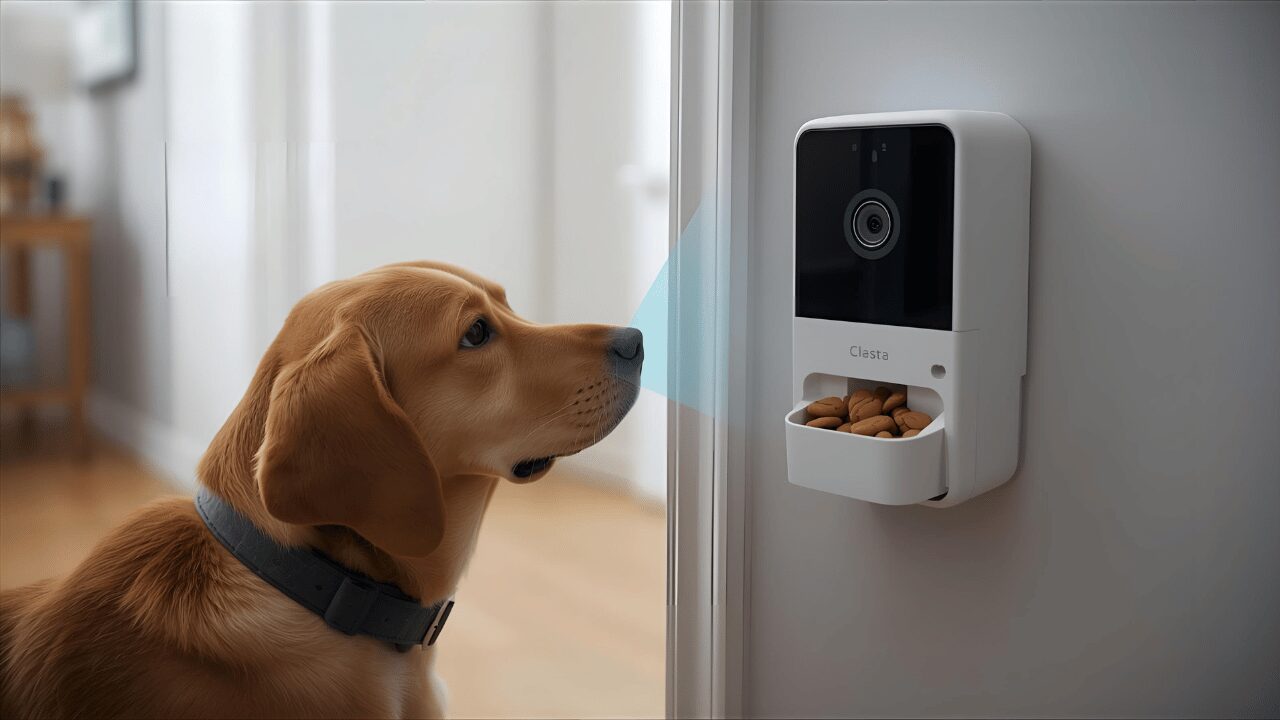
Separation anxiety in dogs is a nightmare. There is no other word for it.
Your dog hits the panic button the second you touch your keys. Some bark or howl for long periods, damage doors and walls, or hurt themselves trying to escape. And you feel guilty every time you leave.
Let’s cut through the noise: separation anxiety doesn't fix itself. You can't "tough love" your way out of a panic attack. That's where AI pet cameras with treat dispensers stop being toys and start being essential training equipment.
The best ones don't just let you watch the train wreck; they let you intervene. You can actively train, reward the rare moments of silence, and catch the anxiety spike before it turns into a full-blown meltdown.
The most useful models alert you when your dog starts barking, let you toss treats remotely to reward calm, and, with a paid plan on some brands, keep video history so you can spot patterns. This isn't about spying on your dog for kicks. It's about having a practical tool to support gradual desensitization, the behavior modification at the heart of most separation anxiety plans.
Let's dig into the four best AI pet cameras that actually help anxious dogs (and the owners who love them).
Why AI Pet Cameras Actually Help With Separation Anxiety
To be direct: most people buy these things thinking they'll just "check in" during lunch. That's not how separation anxiety works.
Separation anxiety is a real anxiety problem, not disobedience. Your dog isn't acting out of spite. Dogs with separation-related problems become genuinely distressed when left alone, and veterinary reviews describe treatment as a mix of behavior modification and, in some cases, medication prescribed by a vet (Sherman & Mills, 2008). If your dog panics when alone, start with a vet visit: they can rule out medical causes and tell you whether medication should be part of the plan.
And watching them suffer in 1080p without being able to do anything?
That just destroys your mental health. But here's where AI pet cameras with treat dispensers change the equation:
They Enable Systematic Desensitization Training
Gradual desensitization means keeping absences short enough that your dog stays calm, then lengthening them very slowly. The logic is simple:
- Leave for 10 seconds → Dog stays calm → Toss treat remotely
- Leave for 30 seconds → Dog stays calm → Toss treat remotely
- Leave for 1 minute → Dog stays calm → Toss treat remotely
- Gradually increase the duration until they believe you always come back
The camera lets you see the exact second they hold it together, and the treat dispenser lets you reward that victory instantly, even when you're miles away. Without a camera, it is much harder to know whether your dog is calm or pacing, and to time the reward. A camera makes timing much easier.
They Catch Anxiety Before It Escalates
A barking alert tells you the moment your dog starts vocalizing, and the live feed shows you the earlier signs to watch for: pacing, whining, staring at the door, heavy panting. That's your cue to intervene before the panic builds. Toss a treat. Try the two-way audio, but test it while you're home first: some dogs calm down when they hear you, others get more agitated because they can't find you. Then make the next absence shorter.
One useful test: if your dog ignores a treat they normally love, they are already too stressed to eat. Take it as a sign that the absence was too long, not as a refusal to cooperate.
They Let You Track Progress Over Time
Cameras with video history (usually part of a paid plan) let you look back at:
- What time of day the demons come out
- How long your dog holds it together before breaking
- Whether your training is actually working or if you're just spinning your wheels
This data is invaluable insight for you and your vet. You're not guessing anymore. You have the black box recording. With that said, let's look at the four cameras worth your money. RELATED CATEGORY: Smart Pet Technology
AI Treat‑Dispensing Pet Cameras: Side‑by‑Side Full Comparison
| Camera | Video / View | Night Vision | Alerts | Treat Capacity / Toss | Subscription | Best For | Link |
|---|---|---|---|---|---|---|---|
| Furbo 360° Dog Camera (No Subscription Required) | 1080p, motorized 360° rotation, 4x zoom | Color night vision (infrared) | Barking alerts free; AI smart alerts and video history with Furbo Nanny (paid) | About 100 round, dry treats (about 0.5 in) | Not required (14-day Nanny trial) | Dogs that move around the room, everyday training | Furbo 360° |
| Petcube Bites 2 Lite | 1080p, wide-angle fixed view, 8x digital zoom | Night vision up to 30 ft | Sound and motion alerts with Petcube Care (paid, optional) | 1.5 lb container; short, medium or long toss; scheduled tossing | Optional | Big treat supply, scheduled rewards, single room | Petcube Bites 2 Lite |
| Furbo Mini 360° (No Subscription Required) | 2K QHD, 360° rotation, 8x zoom | Color night vision (infrared) | Barking/meowing alerts free; AI smart alerts with Furbo Nanny (paid) | Up to 10 small treats (0.25 to 0.5 in) | Not required (14-day Nanny trial) | Small spaces, short training sessions | Furbo Mini 360° |
| Skymee Owl Robot | 1080p, 4x zoom, camera on a robot you drive | Night vision | Infrared sensing triggers play modes; recording to a microSD card (not included) | Treats 4 to 16 mm | No monthly fee (free app) | Interactive play and distraction | Skymee Owl |
Tips: each camera has its own treat size limit, so check it before you stock up on treats. Read the listing title too: some Furbo listings say "Paid Plan Required to Activate", which means no feature works until you subscribe. The Furbo models linked here are the "No Subscription Required" versions.
1. Furbo 360° Dog Camera: Best Overall for Anxiety Training
Amazon Link: Furbo 360° Dog Camera (No Subscription Required)
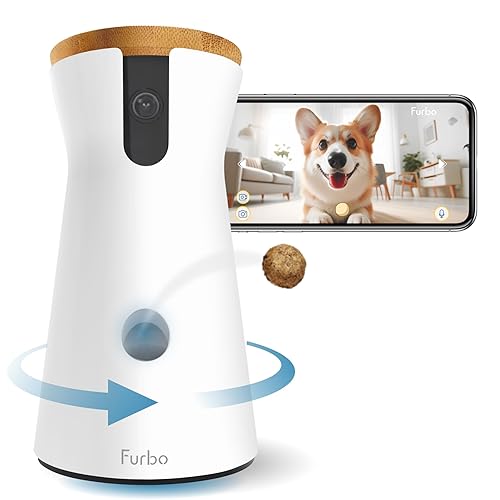
The Furbo 360° covers the most ground: the camera rotates to follow your dog around the room, tosses treats on command and sends barking alerts. This is the "No Subscription Required" version, so live view, rotation, barking alerts, two-way audio and treat tossing work out of the box.
The specs:
- 1080p HD video with motorized 360° rotation: follows your dog around the room, with 4x zoom
- Color night vision: infrared, so you can still see your dog in the dark
- Barking alerts: a push notification when your dog starts barking, included without a subscription
- Treat tossing: holds about 100 round, dry treats around 0.5 in wide, with an adjustable treat size in the app
- Two-way audio: talk to your dog and hear what's happening
- 2.4 GHz Wi-Fi only: 5 GHz networks are not supported
- Optional Furbo Nanny plan: AI smart alerts (such as person and smoke alarm alerts), video history and daily reports, with a 14-day free trial
Why it's the best for anxiety:
The barking alert is the most useful feature here. Many anxious dogs build up from quieter signs (pacing, whining) to barking, so the alert tells you the absence has already gone past what your dog can handle. Open the feed, toss a treat if your dog can still take it, and make the next rep shorter.
The 360° rotation is the other big plus. If your dog paces between the door and the window, a fixed camera misses half the show. This one can follow them.
The training workflow:
- Plant the Furbo near the door or the primary waiting zone
- Leave for 10 seconds while watching the live feed like a hawk
- When your dog holds it together, fire a treat
- Return before the anxiety breaks them
- Repeat until you both stop shaking
Furbo's treat-tossing mechanical whir can become a positive cue. Your dog learns: "That sound = food = good things happen."
The catch:
The AI smart alerts, video history and activity tracking need the paid Furbo Nanny plan. Basic barking alerts, live view, two-way audio and treat tossing stay free on this model. Avoid the listings marked "Paid Plan Required to Activate" unless you want the subscription: on those, the camera only works once a plan is activated.
Who should get this:
- Dogs on a separation anxiety plan with daily short-absence training
- Dogs that move around the room a lot
- Owners who want barking alerts without a monthly fee
- Remote workers needing to monitor short absences
Skip it if:
- Your dog stays in one spot, like a crate (a fixed camera does the job)
- Your dog is mostly fine alone and you only want to check in (a simple camera may be enough)
- You need a wall mount (this sits on a table)
2. Petcube Bites 2 Lite: Best for a Big Treat Supply and Scheduled Tossing
Amazon Link: Petcube Bites 2 Lite
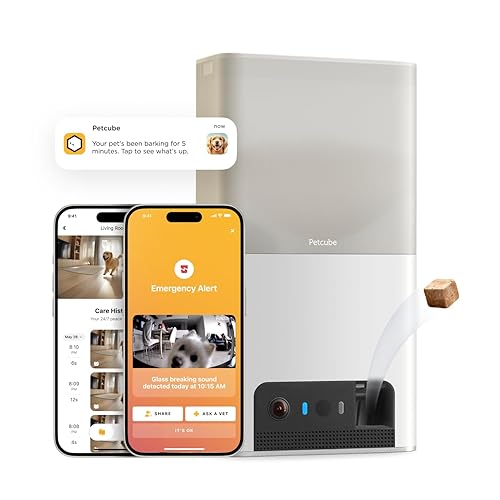
If you want a big treat supply and the option to schedule treats while you're out, the Petcube Bites 2 Lite is the play. It's not flashy, but it gets the job done.
The specs:
- 1080p HD video with a wide-angle view: fixed in place
- 8x digital zoom: zoom in to check for drool or panting
- Night vision: up to 30 feet
- Treat tossing: 1.5 lb dishwasher-safe container for dry, crunchy treats; short, medium or long toss, or on a schedule
- Two-way audio: talk to your dog and hear them back
- Sound and motion alerts: with the optional Petcube Care subscription
- Works with Alexa: if you want to toss treats by voice
- 2.4 GHz Wi-Fi only: it does not connect to 5 GHz networks
Why it works for anxiety:
The wide-angle view covers a good part of a room. If your dog is a "door waiter" who stays put, this will catch them. It doesn't have the AI brain of the Furbo, and the real-time sound and motion alerts need the optional Petcube Care plan. Without it you still get the live feed, two-way audio and treat tossing. The treat flinging is actually kind of fun. The motor spins up, then fling. It creates a game, a distraction to break the fixation on the door.
The budget advantage:
No mandatory subscription. It works out of the box. They offer a sub (Petcube Care), but you don't need it to make the thing function. For anxiety training on a shoestring budget, this keeps you in the game without the monthly bleed.
The catch:
Fixed angle. If your dog paces out of frame, you lose sight of them. You can't pan to find them. It also needs a 2.4 GHz Wi-Fi network, so check your router before buying.
Who should get this:
- Owners who want scheduled treats while they're out
- Dogs with moderate anxiety (not destructive panic)
- Single-room setups (if the dog stays in the crate or one room)
- People who hate subscription models
Skip it if:
- Your dog paces the entire house (you need the pan)
- You want real-time alerts without paying (Petcube's alerts need Petcube Care)
- You have multiple dogs (hard to tell who is barking)
3. Furbo Mini 360°: Best for Small Spaces and Short Sessions

Amazon Link: Furbo Mini 360° Camera (No Subscription Required)
The Furbo Mini 360° is a compact Furbo that still rotates and still tosses treats. The trade-off is a much smaller treat tank. This is the "No Subscription Required" version. Careful when you shop: the plain "Furbo Mini" (without 360°) does not toss treats at all.
The specs:
- 2K QHD video with 360° rotation: auto pet tracking and 8x zoom
- Color night vision: infrared
- Lite treat tossing: up to 10 small treats, 0.25 to 0.5 in; larger treats won't fit
- Two-way audio: with in-app volume control
- Barking/meowing alerts: included without a subscription
- 2.4 GHz Wi-Fi only: 5 GHz networks are not supported
- Optional Furbo Nanny plan: AI smart alerts and video history, with a 14-day free trial
Why it's useful for anxiety:
It's small, so you can put it on a bookshelf or a nightstand without it looking like a monolith. For dogs who struggle in one specific room (like the bedroom), it covers that zone, and the rotation means you don't lose them when they move. It also packs in a bag if you travel with your dog.
The training advantage:
Ten treats is enough for one short desensitization session (a few seconds to a few minutes away), which is exactly what the early weeks of training look like. It uses the same Furbo toss, so your dog learns the same cue.
The catch:
The tank is tiny: 10 treats maximum, and only small ones. For long days out, you'll run out fast. The AI smart alerts and video history still need the paid Nanny plan.
Who should get this:
- Apartment dwellers with little counter space
- Frequent travelers
- Bedroom/Office specific monitoring
- Short, frequent training sessions
Skip it if:
- You want to reward your dog many times during a long absence
- Your dog's favorite treats are bigger than half an inch
- You want one camera to rule them all (get the 360° Dog Camera)
4. Skymee Owl Robot: Best for Interactive Distraction
Amazon Link: Skymee Owl Robot Pet Camera
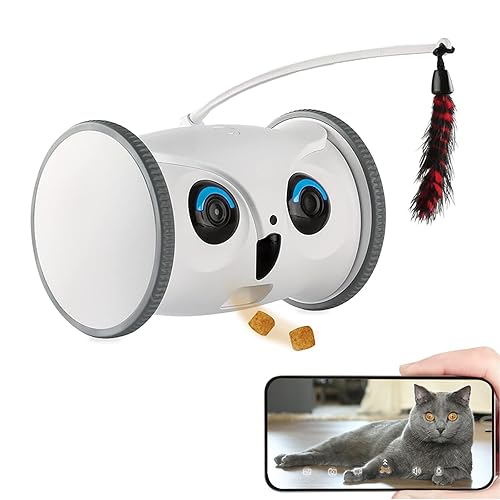
The Skymee Owl is weird. It's not a camera on a shelf; it's a tank that drives around your floor. Hot take: This is either brilliant or a disaster, depending entirely on your dog's psyche.
The specs:
- 1080p HD camera with 4x zoom: mobile, low angle
- Drive it from the app: cruise around the house to find your dog
- Treat tossing: treats from 4 to 16 mm
- Two-way audio: talk while you drive
- Night vision: sees in the dark
- Infrared sensing: triggers interactive action modes when your pet comes close
- Recording: to a microSD (TF) card, not included
- Free app: no monthly fee
- 2.4 GHz Wi-Fi only: 5 GHz networks are not supported
Why it works for some anxious dogs:
Distraction is a powerful drug. If your dog is fixated on the door, a robot rolling by can break that trance. You can drive to them. If they hide under the bed, you can roll in there and offer a peace offering. For high-energy dogs, it's a toy. It's interaction. It burns the nervous energy.
The training potential:
"Find the treat" games. Drive it, drop a treat, run away. It engages the prey drive and shuts off the anxiety brain for a few minutes.
The catch:
This is not for every dog. If your dog is already fearful, a rolling robot can feel like a monster and make things worse. A dog with destructive or aggressive tendencies may simply attack it. It runs on a battery: the listing gives about 8 hours of daily use, and PetsRadar's review reports six to eight hours. Reviewers also mention occasional connection issues. If it dies while your dog is panicking, it's a paperweight.
Who should get this:
- High-energy dogs whose anxiety comes from boredom
- Toy-motivated players
- Owners who want to play video games with their dog
- Tech nerds
Skip it if:
- Your dog is scared of the vacuum (they will hate this)
- You need a reliable, 24/7 sentry
- You have deep carpet (its wheels struggle for traction)
- You hate charging things
Quick Comparison: Which Camera Fits Your Situation?
| Your Dog's Anxiety Level | Best Camera |
|---|---|
| Diagnosed separation anxiety, needs systematic training | Furbo 360° (#1) |
| Moderate anxiety, you want scheduled treats | Petcube Bites 2 Lite (#2) |
| Anxiety in small spaces, you travel often | Furbo Mini 360° (#3) |
| High-energy anxiety, needs distraction games | Skymee Owl Robot (#4) |
How to Actually Use These Cameras for Separation Anxiety Training
Buying the gear is the easy part. Using it correctly is the work. Here's a step-by-step plan built on gradual desensitization and positive reinforcement. The weeks are only a rough guide: go at your dog's pace, and if your vet or a behavior professional gives you a different plan, follow theirs.
Week 1-2: Baseline & Conditioning
Goal: Make the camera your friend.
- Set it up. Don't leave yet.
- Toss treats randomly while you are watching TV.
- Teach the dog: Mechanical noise = Food.
- Build the bank account of trust.
Week 3-4: Door Conditioning
Goal: Break the "Keys = Abandonment" link.
- Put on shoes → Toss treat → Take off shoes.
- Grab keys → Toss treat → Put down keys.
- Touch door handle → Toss treat → Walk away.
- Open door → Toss treat → Close door.
- Do this 20 times a day until they look bored.
Week 5-8: Time-Based Desensitization
Goal: Stretch the rubber band without snapping it.
- Leave for 10 seconds → Watch cam → Dog calm? → Treat → Return.
- 30 seconds → Same deal.
- 1 minute → Same deal.
- Push the envelope by seconds, not minutes.
Critical rule: Always come back before they panic. If they break at 3 minutes, that rep was too long. Go back to 2 minutes.
Week 9+: Real-World Application
Goal: Actual life.
- Go to the store.
- Watch the feed closely at the start of the absence.
- Treat every 5 minutes if they are good.
- Fade the treats out over time.
Pro tip: Trust the alerts. If your phone buzzes, check the feed. If they are losing it, go home. Don't let them "cry it out." Ending the absence before panic builds is the whole point of the method. RELATED: Pet Treats Guide: Choose Healthy & Delicious Snacks for Your Pet
The Bottom Line: AI Cameras Aren't Magic, But They Help
Let's be real: This camera won't fix your dog. You fix your dog. The camera just gives you the eyes to do it. But here's what they will do:
- Give you the truth about what happens when the door closes
- Make gradual desensitization practical, even when you're out of the house
- Catch the panic before it builds
- Allow remote rewards (which is basically magic)
- Provide data so you aren't guessing
Separation anxiety breaks your heart. It makes you a prisoner in your own home. These tools don't fix the guilt. But they give you a path out of the woods. Pick the one you can afford. Commit to the protocol.
Give it weeks to months of steady work. You'll see the progress in the silence. You'll see it in the nap they take while you're at the store. And one day, you'll just... leave. And it will be fine.
RELATED ARTICLE: 10 Natural Remedies for Dog Separation Anxiety
How to Choose the Right AI Pet Camera
When selecting an AI pet camera with treat dispenser, consider these six factors:
1. Home Size
- Big house? Choose a camera that rotates (both Furbo models here do) or at least a wide-angle lens. A narrow fixed view leaves blind spots.
- Open floor plan? Get two cameras. Blind spots are where the trouble happens.
2. Number of Pets
- Short sessions, one dog: a small tank like the Mini 360° (10 treats) is enough.
- Long days or several dogs: pick a big container, like the Furbo 360° (about 100 treats) or the Petcube's 1.5 lb container.
3. Internet Speed
- Higher resolution needs more upload bandwidth. A 2K camera sends more data than a 1080p one, so if your upload speed is weak, 1080p may stream more smoothly.
- Test your Wi-Fi at the dog's level, not just near the router.
4. Budget Range
- Count the full cost: the camera price plus a year of any subscription you'll actually use.
- Read the listing title: "Paid Plan Required to Activate" means the camera won't work until you subscribe. "No Subscription Required" versions usually cost more up front but keep the basic features free.
5. Key Features to Prioritize
- App stability is more important than video quality.
- Night vision is non-negotiable.
- Two‑way audio needs to be loud enough to be heard over a bark.
- Latency matters. If the alert is 2 minutes late, it's useless.
- Storage is good for proof, but live feed is king.
6. Wi‑Fi Connectivity
- All four cameras in this list connect to 2.4 GHz Wi-Fi only.
- Most routers broadcast 2.4 GHz alongside 5 GHz, but check your router settings before you buy.
Ready to help your anxious dog?
Start here:
- Best overall: Furbo 360° Dog Camera
- Biggest treat supply: Petcube Bites 2 Lite
- Smallest: Furbo Mini 360°
Your dog is waiting. And honestly? They're probably staring at the door right now. Let's fix that.
Frequently Asked Questions
What if my dog ignores the treats because they're too anxious?
Then that rep was too long: they are over threshold. Shorten the next one. Back it up. If 10 seconds is too long, do 5. If 5 is too long, just put on your shoes. Find the point where they will eat. Start there.
Can I use the camera to punish bad behavior (like barking)?
No. Never. Do not yell at your dog through the speaker. They are panicking, not misbehaving. If you scream at a terrified dog, you just confirmed their fear that the world is ending. Only use it to reward.
Do I need the subscription features for separation anxiety training?
Not for basic training. The Furbo models linked here (No Subscription Required versions) include barking alerts, live view, two-way audio and treat tossing for free. The Petcube works without Petcube Care too, but its sound and motion alerts need the plan. Paid plans add AI alerts and video history, which help if you can't keep an eye on your phone.
How long does separation anxiety training take?
It varies a lot from dog to dog: expect weeks for mild cases and many months for severe ones. Anyone who tells you they can fix it in a weekend is lying to you. Your vet can tell you whether medication could help. It’s a marathon.
Should I leave the camera on 24/7?
You can, but most people only need it while they're out. Watch closely at the start of each absence, when an anxious dog is most likely to struggle, and check video history (if you have it) for the rest.
Will a pet camera with treats cure my dog's separation anxiety?
No. It's a hammer, not a carpenter. The camera is a tool for desensitization training. It lets you do the work, but it doesn't do the work for you. You still need the protocol, and often professional help.
How many treats per day should I toss during training?
Depends on the dog. Use small, pea-sized pieces and count them in the daily food allowance. A common vet guideline is to keep treats under about 10% of daily calories, so cut their dinner portion on heavy training days. Don't make them fat while making them brave.

Related Articles
5 Best Self-Cleaning Litter Boxes: Safety Features Compared
The 5 best self-cleaning litter boxes compared with safety first: which designs can trap a cat, which cats should not use one, and how open-top and drum models …

4 Best GPS Trackers for Dogs: Escape Alerts Compared
The 4 best GPS trackers for dogs compared on escape alert speed, battery life, 3-year subscription cost and waterproofing, from Tractive to Dogtra and AirTag.

Training Deaf Dogs with Hand Signals: A Real-World Guide
Training deaf dogs with hand signals: safety first, the shoulder tap, a visual marker, core signals, vibration collars, night walks and desensitization.

10 Activities to Keep Your Dog Mentally Stimulated
10 ways to keep your dog's brain busy, from puzzle toys and scent work to training games, with tips to match each activity to your dog.

5 Best Low-Dust Litters for Cats with Asthma
5 low-dust, unscented litters for cats with asthma, compared from their listings, plus litter box habits that cut dust and ammonia. See your vet first.

7 Activities to Keep Your Cat Mentally Stimulated
Bored indoor cat? Try these 7 enrichment activities, from puzzle toys to clicker training and play routines, to curb boredom and problem behavior.
Comments (0)
No comments yet. Be the first to share your thoughts!
Leave a Reply